Styling Guide: Colors & Gradients
Anywhere a color is required, you can use a Solid Color or a Gradient (LinearGradient, RadialGradient, SweepGradient, or TwoPointConicalGradient).
Solid Colors
They can be specified using the SolidColor class or using a string in different formats:
| Format | Example | Description |
|---|---|---|
| Named Color | "red", "gold" |
Common CSS color names. |
| 6-digit Hex | "#FF5733" |
Standard RRGGBB format. |
| 3-digit Hex | "#F53" |
Shorthand for "#FF5533". |
| 8-digit Hex (HexA) | "#FF573380" |
RRGGBBAA, where AA is the alpha/opacity. |
Named Colors with NamedColor Enum
For better type safety and autocompletion, you can use the NamedColor enum which provides all CSS named colors:
from pictex import Canvas, SolidColor, NamedColor

Canvas().color(NamedColor.RED)
Canvas().color(NamedColor.CORNFLOWERBLUE)
Canvas().color(NamedColor.GOLD)
For example, all these are valid ways to set the color to red:
from pictex import Canvas, SolidColor, NamedColor

Canvas().color("#FF0000FF")
Canvas().color("#FF0000")
Canvas().color("#F00")
Canvas().color("red")
Canvas().color(NamedColor.RED)
Canvas().color(SolidColor(255, 0, 0, 255))
Canvas().color(SolidColor(255, 0, 0))
Linear Gradients
You can use a LinearGradient object anywhere a color is accepted: in .color(), .text_stroke(), border(), .background_color(), and even in text decorations like .underline(). Only shadow colors must be solid.
A LinearGradient has a few key parameters:
- colors: A list of color strings.
- stops (Optional): A list of floats (0.0 to 1.0) specifying the position of each color.
- start_point & end_point (Optional): Define the direction of the gradient. (0,0) is top-left, (1,1) is bottom-right.
Example: Gradient on a Background
from pictex import Canvas, LinearGradient

gradient = LinearGradient(
    colors=["#43C6AC", "#191654"],
    start_point=(0.0, 0.0), # Top-left
    end_point=(1.0, 1.0)   # Bottom-right
)

canvas = (
    Canvas()
    .font_size(90)
    .color("white")
    .padding(40)
    .background_color(gradient)
    .border_radius(25)
)

canvas.render("Gradient BG").save("gradient_bg.png")

Radial Gradients
A RadialGradient creates circular gradients from a center point outward.
from pictex import Canvas, RadialGradient

(
    Canvas()
    .background_color(RadialGradient(["yellow", "orange", "purple"]))
    .font_size(150)
    .font_family("Impact")
    .color("beige")
    .text_stroke(4, "black")
    .padding(30)
    .render("Radial")
    .save("radial.png")
)

Sweep Gradients
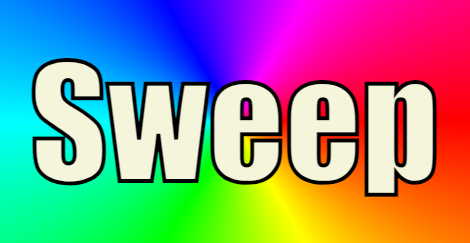
A SweepGradient creates conical gradients sweeping around a center point (full 360°).
from pictex import Canvas, SweepGradient

(
    Canvas()
    .background_color(SweepGradient(["red", "yellow", "lime", "cyan", "blue", "magenta", "red"]))
    .font_size(150)
    .font_family("Impact")
    .color("beige")
    .text_stroke(4, "black")
    .padding(30)
    .render("Sweep")
    .save("sweep.png")
)
Two-Point Conical Gradients
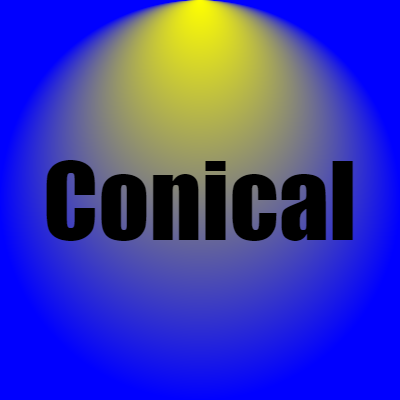
A TwoPointConicalGradient transitions between two circles with different radii.
from pictex import Canvas, TwoPointConicalGradient, Text

(
    Canvas()
    .background_color(TwoPointConicalGradient(colors=["yellow", "blue"], start=(0.5, 0)))
    .size(400, 400)
    .font_size(100)
    .font_family("Impact")
    .render(Text("Conical").position("center", "center"))
    .save("conical.png")
)
Showcase: Gradients Everywhere
Let's combine everything. Here, we apply different gradients to the text fill, its outline, and its underline.
from pictex import Canvas, LinearGradient, RadialGradient, SweepGradient

background_gradient = SweepGradient(colors=["pink", "beige", "pink"])
text_gradient = LinearGradient(colors=["#FFD700", "#FF6B6B"])
stroke_gradient = RadialGradient(colors=["#4A00E0", "#8E2DE2"])
underline_gradient = LinearGradient(
    colors=["#00F260", "#0575E6"],
    start_point=(0.5, 0.0),
    end_point=(0.5, 1.0)
)
border_gradient = LinearGradient(colors=["blue", "darkcyan"])

canvas = (
    Canvas()
    .font_family("Impact")
    .font_size(150)
    .color(text_gradient)
    .background_color(background_gradient)
    .text_stroke(width=8, color=stroke_gradient)
    .underline(thickness=15, color=underline_gradient)
    .border(width=10, color=border_gradient)
    .padding(30)
)

canvas.render("GRADIENTS!").save("gradients_everywhere.png")