Getting Started
Welcome to PicTex! This guide will get you from installation to your first composed image in just a few minutes.
The Core Idea: Composing Builders
The core idea of PicTex is to build complex visuals by composing simple builders.
-
Builders: These are the fundamental building blocks of your image. You have content builders like
TextandImage, and layout builders likeRowandColumnto arrange them. -
Canvas: This is the top-level container for your entire image. You can use it to set global styles (like a default font or a background color) and to kick off the final render.
The workflow is simple: you create and nest builders to form a tree structure representing your visual, and then you tell the Canvas to render it.
Quickstart: Creating a User Banner
Let's build a simple user banner to see these concepts in action.
from pictex import Canvas, Row, Column, Text, Image

# 1. Create the individual content builders
avatar = (
    Image("avatar.jpg")
    .size(60, 60)
    .border_radius('50%') # Make it circular
)

user_info = Column(
    Text("Alex Doe").font_size(20).font_weight(700),
    Text("@alexdoe").color("#657786")
).gap(4) # Add a 4px vertical gap between the texts

# 2. Compose the builders in a layout container
user_banner = Row(
    avatar,
    user_info
).gap(15).align_items('center')  # Vertically center the avatar and user info

# 3. Create a Canvas and render the final composition
canvas = Canvas().padding(20).background_color("#F5F8FA")
image = canvas.render(user_banner)

# 4. Save the result
image.save("user_banner.png")

This example shows the power of composition: an Image and a Column are nested inside a Row to create a clean, aligned component.
Working with the BitmapImage Object
The BitmapImage object is the final rendered product from canvas.render(). It holds the pixel data and provides helpful methods.
# Assuming 'image' is an Image object from the example above

# Save to a file (format is inferred from extension)
image.save("output.png")

# Get a Pillow Image object (requires `pip install Pillow`)
pil_image = image.to_pillow()
pil_image.show()

# Get a NumPy array for use with other libraries
numpy_array_bgra = image.to_numpy()
Working with the VectorImage Object
The VectorImage object, returned by canvas.render_as_svg(), holds the SVG content as a string.
vector_image = canvas.render_as_svg(user_banner)

# Save to a file
vector_image.save("output.svg")

# Get the raw SVG string
svg_string = vector_image.svg
Canvas as a Style Template
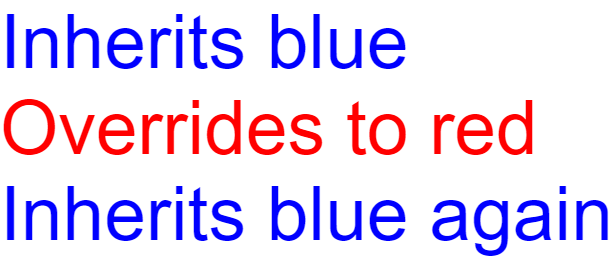
The Canvas acts as a global style template. Properties you set on the Canvas are inherited by all elements unless explicitly overridden on individual builders.
Inherited properties:
- Typography: font_family, font_size, font_weight, font_style, color
- Text layout: text_align, line_height
- Text effects: text_shadows, text_stroke, underline, strikethrough
Not inherited (element-specific):
- Box model: padding, margin, border, border_radius
- Background: background_color, background_image
- Effects: box_shadows
- Layout: size, position, flex_grow, etc.
from pictex import Canvas, Column, Text

# Canvas sets global typography
canvas = (
    Canvas()
    .font_family("Arial")
    .font_size(75)
    .color("blue")
)

# These inherit the font settings but can override them
layout = Column(
    Text("Inherits blue"),
    Text("Overrides to red").color("red"),
    Text("Inherits blue again")
)

canvas.render(layout).save("inheritance_example.png")
What's Next?
You now understand the basic workflow of PicTex. To master its full potential, explore our detailed guides in the following order:
-
Core Concepts: Builders & Layout A deep dive into
RowandColumn, and how to control distribution, alignment, and spacing. -
Styling: The Box Model Learn how sizing, padding, borders, and backgrounds work with the powerful
border-boxmodel. -
Styling: Text & Fonts Master custom fonts, variable fonts, text shadows, and decorations.
-
Styling: Colors & Gradients Discover how to apply solid colors and beautiful linear gradients to any part of your composition.
-
Exporting Your Image Take full control over the final output, including cropping strategies and SVG font embedding.